Browser Download Warning
Your browser may flag the download because the file isn't commonly downloaded yet. This is normal for new software — here's how to keep the file:
-
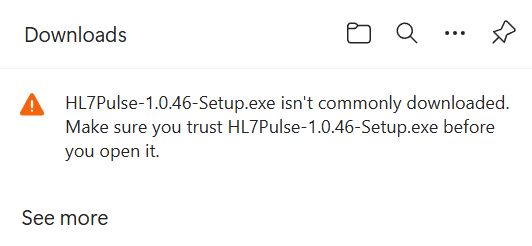
You'll see a download warning
Your browser will show a message like "isn't commonly downloaded" with a warning icon. This is simply because HL7 Pulse is a newer application.
-
Click the menu and select "Keep"
Click the
...menu orSee morelink on the warning, then selectKeepto save the file to your computer.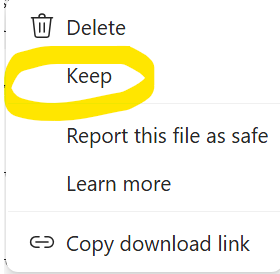
-
Click "Keep anyway"
A second prompt may appear asking you to confirm. Click the
Keep anywaybutton to finish saving the file.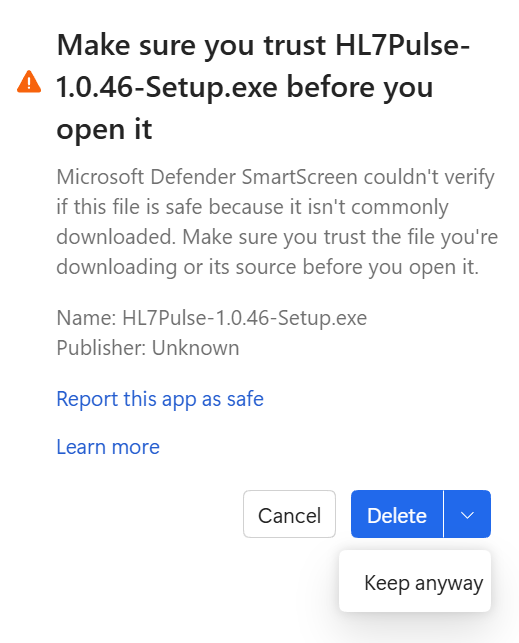
Windows SmartScreen Notice
When you run the installer, Windows may display a SmartScreen warning. This is completely normal for new software that hasn't yet been code-signed. HL7 Pulse is safe to install — here's how to proceed:
-
Run the installer
Double-click the downloaded
HL7Pulse-1.0.70-Setup.exefile. -
SmartScreen appears
If Windows SmartScreen pops up saying "Windows protected your PC", don't worry. Click
More infoto reveal additional options. -
Click "Run anyway"
After clicking "More info", a
Run anywaybutton will appear. Click it to continue with the installation. -
Complete the setup
Follow the installer prompts. HL7 Pulse will be installed and ready to use in seconds.
Why does this happen?
About Code Signing
Windows SmartScreen flags applications that haven't been digitally code-signed by a recognized Certificate Authority. Code signing certificates require an annual fee and an established publisher identity. As a new and growing product, HL7 Pulse is not yet code-signed — but the application itself is completely safe.
Code Signing Is On Our Roadmap
Once HL7 Pulse reaches a sustainable customer base, we plan to purchase an Extended Validation (EV) code signing certificate. This will eliminate the SmartScreen warning entirely and provide an even smoother installation experience. Your support as an early adopter helps make that happen.
Your Data Stays With You
Privacy by Design
HL7 Pulse runs entirely on your local machine. Your HL7 messages, patient data, and analysis results are never transmitted to any external server. The only network communication is an optional license verification check — no healthcare data ever leaves your computer.